This example is based on "arduino and memory how to" article. Let's say that we want to make a single level vertical circular menu.
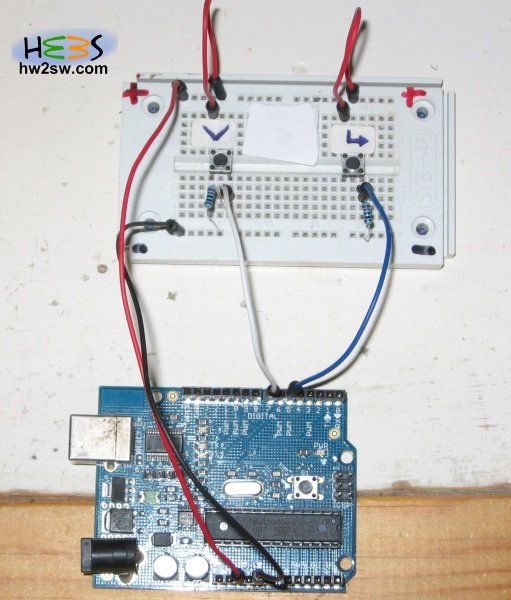
We need two buttons the down and the enter.
We connect the down button at pin 7 and the enter button at pin 5. like the photo below:
Pressing the down button we increase the BtnDownCounter until the maximum number of the menu elements then BtnDownCounter starts from the value 1 again.
By doing this we have the circularity.
Each time that the enter button is pressed the algorithm looks at the BtnDownCounter value and executes the associated code.
//The DOWN button
const int BtnDownPin = 7;
int BtnDownCounter = 0;
int BtnDownState = 0;
int BtnDownLastState = 0;

//The ENTER button
const int BtnEnterPin = 5;
int BtnEnterState = 0;

void ClearScreen(){
  int i;
  for (i = 0; i < 15; i = i + 1) {
    Serial.println();
  }
}

void setup()                      // the set up part (runs only once)
{
  Serial.begin(9600);             // set up Serial library at 9600 bps

  pinMode(BtnDownPin, INPUT);
  pinMode(BtnEnterPin, INPUT);

  BtnDownCounter=1;
  ClearScreen();
  Serial.println(">MENU1");
  Serial.println("menu2");

}

void loop()                       // The main loop (runs over and over again)
{

  BtnDownState = digitalRead(BtnDownPin);
  BtnEnterState = digitalRead(BtnEnterPin);

  //THE DOWN BUTTON
  if (BtnDownState != BtnDownLastState) {

    if (BtnDownState == HIGH) {

      if (BtnDownCounter < 4) {
        BtnDownCounter++;
      } else {
        BtnDownCounter = 1;
      }

      if (BtnDownCounter == 1) {         //Menu 1
        ClearScreen();
        Serial.println(">MENU1");
        Serial.println("menu2");
      } else if (BtnDownCounter == 2) {  //Menu 2
        ClearScreen();
        Serial.println(">MENU2");
        Serial.println("menu3");
      } else if (BtnDownCounter == 3) {  //Menu 3
        ClearScreen();
        Serial.println(">MENU3");
        Serial.println("menu4");
      } else if (BtnDownCounter == 4) {  //Menu 4
        ClearScreen();
        Serial.println(">MENU4");
        Serial.println("menu1");
      }

    }

  }

  BtnDownLastState = BtnDownState;

  //THE ENTER BUTTON
  if (BtnEnterState == HIGH) {
    if (BtnDownCounter == 1) {
      ClearScreen();
      Serial.println("You have entered at menu 1");
    } else if (BtnDownCounter == 2) {
      ClearScreen();
      Serial.println("You have entered at menu 2");
    } else if (BtnDownCounter == 3) {
      ClearScreen();
      Serial.println("You have entered at menu 3");
    } else if (BtnDownCounter == 4) {
      ClearScreen();
      Serial.println("You have entered at menu 4");
    }

  }

}
You can download this demo from here : CircularMenuSimple
Below we can see this demo in video :
In the next page we will see an advanced multilevel circular menu...